You can do most early-stage ASO for free: the stores' own consoles show how people find your app, and several tools offer free plans or open-source options for keyword tracking. A paid tool earns its price when you need keywords you can rank for, position history and competitor views.
This article sorts free ASO options by what they actually do. Google Play Console shows the search terms that bring visitors, and App Store Connect shows how many come from App Store search. For keyword tracking, AppFollow, ASOMobile and Applyra have permanent free plans, RespectASO is open source, and AppTweak, MobileAction, Sonar and App Radar offer 7-day trials rather than free plans. We compare plan limits, explain what trials really give you, say when upgrading makes sense, and finish with a starter workflow and a short FAQ. Prices change often, so check the vendor's page before you buy.
What can you do for free in ASO?
If you are starting an indie app from scratch in 2026, you don't actually need to pay anything for ASO. The free tier of available tools (open-source scrapers, free APIs, public autocomplete endpoints) is meaningfully more capable than what existed even three years ago. That is ASO Pilot's assessment, and ASO Pilot sells a paid tool of its own, so read it as one vendor's view.
The first free job is research. Autocomplete is the demand signal: the store only suggests terms that real users in that country actually type. If a keyword shows up in autocomplete, there's demand; if it doesn't, you're guessing. Another free check is to open the App Store website in any country, search a keyword and look at the top 10 results. For a method that goes beyond these two checks, see the keyword research guide.
The second free job is editing. The name, subtitle, keyword field, screenshots and store A/B tests are all set in App Store Connect and Google Play Console. In the consoles, you can see how people find your app and test your listing for free.
The third is basic tracking, covered by the free plans in the heading "What does a free ASO tool include?"
Which tracking limits might a team outgrow? A paid tool adds keyword popularity across many terms, rank history and competitor tracking. The catch with the consoles is that they only show your own app; to see competitors' keywords, rankings and revenue, you need a separate tool.
What does a free ASO tool include?
Usually keyword tracking with caps on apps, keywords, countries or history, and the caps differ a lot from tool to tool. The table below uses each vendor's own pages as read by the sources cited.
| Tool | What the free option includes |
|---|---|
| Applyra | 1 app, 5 keywords, 1 competitor and 7 days of history, on both stores |
| AppFollow | Up to 2 apps, with ASO tools, review analysis and 7 days of history |
| RespectASO | Keyword research across 175 App Store storefronts, difficulty, competitor and ranking history, 3 keywords per search in the free edition |
| asorocket | One app plus three competitors, 25 keywords in up to 3 countries with daily ranks, and an ASO score as you type |
| ASOClimb | $0 with every feature at small monthly volumes, for 1 app |
| OpenASO | Open source under the MIT license: no subscription, no account, no keyword limits |
AppFollow's own pages disagree on its keyword allowance, so the comparison source leaves that number out, and so do we. Check the vendor's pricing page for it.
Free does not mean the same data. OpenASO says popularity comes from App Store autocomplete and difficulty from the strength of the current top 10, because Apple only shares real search volume through Search Ads. ASOClimb is similarly open that its traffic, difficulty and opportunity scores are models, not store-reported search volume. Treat these scores as relative signals for comparing keywords, not as traffic forecasts. OpenASO also says rankings themselves aren't estimated: they're the same ordered results the App Store shows.
Refresh rates vary too. OpenASO refreshes tracked keywords once a day while the app is open, asorocket checks each keyword once a day in each country you track it in, and AppASO describes weekly rank checks.
Which of these is "best" depends on whether you need one app on both stores, many keywords on one store, or no account at all. For wider paid and free comparisons, see the tool comparison guide.
Do ASO tools offer a free trial?
Yes, many do, but trial length and entry terms differ. AppTweak offers 7 days and asks for billing information to verify the account; MobileAction gives 7 days for ASO; Sonar and App Radar give 7 days and require a card. Sonar's page says "There's no free plan." Astro lists no free plan or trial and costs $108 a year.
Some trials ask for no card at all. Every new asorocket install starts with 14 days of everything, the Studio features too, with no card and no account. That trial also has a soft landing: when it ends, the app continues on the Free plan with your data intact; keywords and apps beyond the Free limits are kept but no longer refreshed, and nothing you tracked is deleted.
Others charge a small amount up front. ASOClimb's Pro has a 7-day trial for $1, then $10 a month, and you can cancel any time.
A trial and a free plan solve different problems. A trial lets you test paid features such as competitor tracking before committing, while a free plan is something you can keep using indefinitely within its caps. If you only want to try a tool, check whether it needs a card first. Fastemy also lists a Pro tier at $19 a month, marked "coming soon", with live rank and demand, daily ranks and alerts, so check whether a listed plan can actually be bought yet.
For help choosing which tool deserves a trial, the indie developer guide covers priorities for small teams.
Free vs paid ASO tools: when to upgrade
Stay free until a specific job outgrows the caps. The consoles and free plans cover day-one work, and a paid tool is not needed on day one because Apple's and Google's own consoles show how people find your app and let you test your listing for free.
The first trigger is breadth. Applyra's free plan holds 5 keywords and 1 competitor, so a team watching a wide keyword set or several rivals may hit the ceiling quickly. The second is history: AppFollow's and Applyra's free plans list 7 days of history, which makes longer trends hard to read. The third is competitors. A paid tool earns its price when you need to pick keywords you can actually rank for, watch positions over time and see what competitors do, which the consoles don't show.
Price is a smaller hurdle than many expect. Astro at $108 a year ($9 a month, billed annually) is the cheapest paid tool that source found, but it runs only on a Mac and covers only the App Store. MobileAction's Lite plan is $15 a month for 100 keywords. Note that the source making these comparisons sells its own tool, GetAppNiche, and says it stuck to what each vendor's website states.
Another reason to pay is advice rather than data. Free tools, and most paid ones, tell you what's wrong but don't write the fix. If you'd rather copy and paste a proposed edit than think through every fix yourself, prescriptive tooling earns its price.
If you do upgrade, look for tools that keep observations dated and scoped. LiteASO's public features page describes dated rankings within your plan limits across App Store and Google Play storefronts. That is an attributed description, not a verified account entitlement or performance result. For a broader view of the full strategy, see the App Store optimization guide.
A starter workflow with free tools
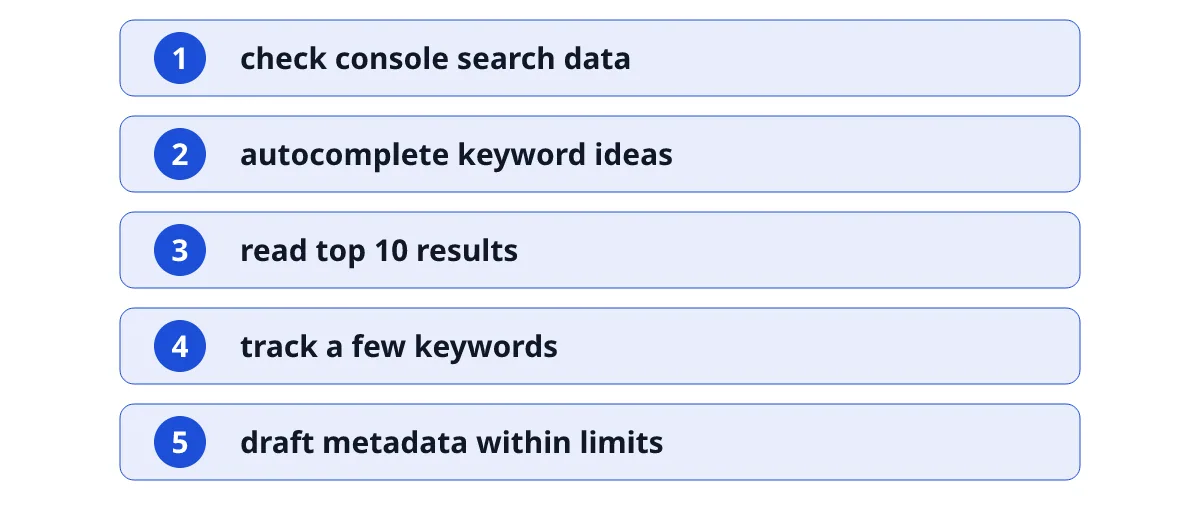
This sequence needs no paid plan. It reuses the checks described earlier, in an order that moves from evidence to edits.
- Open your store console and note which search terms or search-driven visits already reach your app. Google Play Console shows the search terms that bring visitors, and App Store Connect shows how many come from App Store search.
- Type seed keywords into the store's search box and write down what autocomplete suggests, since a keyword that shows up in autocomplete has demand, and one that doesn't is a guess.
- Search your best candidates and look at the top 10 results.
- Put a handful of keywords into a free tracker. Caps are small, so pick the few that matter most, as the plan limits in the comparison table show.
- Draft your title, subtitle and keyword field. LiteASO's public features page describes a workspace to create, edit, preview and diagnose drafts against published platform limits, though that is an attributed description, not verified product behavior.
- Publish in the console, then check dated rank changes later.
If you built the app with AI and need downloads, the first 1,000 downloads guide is the next read.
FAQ
Is there a free ASO trial? Yes. Every new asorocket install includes 14 days of everything, with no card and no account. AppTweak, Sonar and App Radar offer 7 days.
Which free tools are best? It depends on your needs: AppFollow, ASOMobile and Applyra have permanent free plans, and RespectASO is open source.
Can I do keyword research for free? Yes. Autocomplete shows terms real users type, and a keyword that appears there has demand. You can also search a keyword on the App Store website and look at the top 10 results. For Google Play specifics, see the Google Play guide.
Do free tools cover everything? No. A paid tool earns its price when you need rankable keywords, position history and competitor views. Free plans cover some of this within caps.
What does ASOClimb Pro cost after its trial? $10 a month, after a $1 trial. The free plan is separate: $0 for 1 app.
Sources
- Best ASO Tools in 2026: 12 Tools Compared (Free & Paid) | GetAppNiche
- Free ASO Tools for Indie Developers (2026): What Each Free Plan Includes · Fastemy ASO Agent
- The best free ASO tools in 2026 (and where they fall short) — ASO Pilot
- Free ASO tool for the App Store and Google Play · asorocket
- ASOClimb pricing · Free ASO tool, Pro at $10 a month
- OpenASO: the free, open-source ASO tool
- AppASO - Free ASO Tool for iOS & Android
- Fastemy ASO Agent: Rank #1 on the App Store & Google Play
- liteaso.com