ASO ranking factors fall into two groups. Direct search signals decide whether your app matches a query at all: on Apple's App Store that means text relevance (matches for the app's title, keywords, and primary category), and on Google Play it means the title, short description and full description. Behavior signals such as downloads, ratings and reviews are also named as ranking inputs, and ratings are visible to customers who choose an app.
Apple says plainly that search results are based on a number of factors, including text relevance (matches for your app's title, subtitle, keywords, and primary category), as well as user behavior (downloads, ratings and reviews, and more). What neither store publishes is the weighting. One guide puts it this way: the App Store and Google Play rank apps using algorithms neither Apple nor Google publishes, and neither is a ranking contract you can optimize against directly. So a good ASO plan separates what the stores state, what third parties infer, and what you can observe in your own data.
This guide starts with a definition of a ranking factor, then covers what Apple confirms, how those signals work in practice on iOS, and what is known about Google Play. It then looks at whether ratings matter, how search signals differ from conversion influences, a step-by-step process for improving keyword rankings, which popular claims deserve caution, and what you can measure and change yourself. A short FAQ closes the guide.
What counts as a ranking factor in ASO?
A ranking factor, in this guide, is any input a store's search system uses to decide which apps appear for a query and in what order. That is a narrower idea than "anything that helps an app succeed." A strong icon may lift downloads, yet it only counts as a ranking factor if the store feeds it into ranking.
The evidence comes in three grades. The strongest is the store's own statement: Apple says searches use app and in-app purchase metadata from your product page to deliver the most relevant results. The second is patent text. One site that read Apple's search patents notes that it's uncertain whether these patents are actually implemented in the algorithms, and that several of these documents have lapsed or expired. The third is correlation work. A Revenue Hacker analysis of a cross-section of the top 500 iOS (U.S. Apple App Store) and the top 500 Android (U.S. Google Play) apps reported a 29% correlation in the App Store and a 40% correlation in Google Play between ratings count and rank, which shows association, not a stated mechanism.
Search rank and chart rank are also different systems. Search rank cares about keyword relevance in ways chart rank doesn't, and Top Grossing cares about revenue while Top Free ignores it. The rest of this guide is about search, and it says which grade of evidence supports each claim. For a broader overview of the discipline, see the full ASO strategy guide.
Which signals does Apple confirm for App Store search?
Apple names two families of inputs. The first is text relevance, and Apple's developer page lists matches for your app's title, subtitle, keywords, and primary category. Its consumer-facing explanation adds that the relevance of text and titles, keywords and descriptive categories provided in the app metadata are among the parameters for ranking and discoverability. The second family is user behavior, which Apple describes as downloads, ratings and reviews, and more.
The wording differs slightly between Apple's pages, and the differences are informative. The discoverability page lists the app's title, keywords, and primary category without the subtitle, while the search page includes it. Apple's consumer page also mentions application downloads and date of launch on the App Store, and the number and quality of ratings and reviews. Treat the union of these lists as what Apple has said, and treat anything beyond it as inference.
Two details deserve attention. The primary category matters twice: it helps users find your app when browsing or filtering search results, and it determines in which tab your app appears on the App Store. And Apple states directly that promotional text doesn't affect your app's search ranking so it should not be used to display keywords.
Apple also says it is constantly evolving how search works on the App Store, so the lists above are a snapshot, not a fixed formula. Patent text points the same way in general terms. One patent excerpt describes a ranking score generated for each app, based on a comparison between app characteristics and search-query terms, but the site quoting it cautions that it's uncertain whether these patents are actually implemented in the algorithms.
Paid placements sit outside this list. Apple says Search Ads placements are clearly distinguished from organic App Store placements and search results with a prominent "Ad" mark, and typically have a border and unique background shading. For the field-by-field work on two of the text fields Apple names for text relevance, the title and subtitle guide goes further.
How do iOS ranking factors work in practice?
On iOS, text fields decide which queries you can appear for, and behavior signals then influence where you land among the apps that match. One guide states the first half bluntly: search ranking is keyword-deterministic, so if your app has "meditation" in its title, it will rank for "meditation", and the only questions are how high and in which countries. That guide is a third-party view, not Apple's, but it fits Apple's own statement that keywords help determine where your app appears in search results.
The fields that carry this work on iOS are the title, subtitle and keywords field. Apple's advice for filling them is plain: choose keywords based on words people may use to find an app like yours, and be specific when describing your app's features and functionality. Because the same guide adds that metadata, localization, and review count dominate, it is worth checking which storefront languages you have actually filled in. The localization guide covers that in more depth.
Search results show more than a ranked list. Apple notes that your app's rating and up to three screenshots or app previews may display in search results depending on the platform and image orientation. In-App Events can appear too, but people who have downloaded your app before will see your event card, while people who have never downloaded it will see your screenshots or app previews instead.
To see how your own listing fares, Apple points to analytics: use App Analytics in App Store Connect to monitor impressions, conversion rate and downloads, and filter by source type to see how many people downloaded your app from App Store search. Keep in mind that your Apple Ads performance shows up here as well, so read search figures with that in mind.
What affects Google Play search rankings?
Google Play ranks on text in the title, short description and full description, plus behavior and quality signals after install, though Google publishes no weighting. The text side is documented by third parties: one guide lists the keyword match fields as Google Play title, short description and full description. A tool vendor's audit rubric agrees on the structure, noting that Google Play has no subtitle or keyword field, so those factors are not listed there, and the short description takes their place. The same rubric says the description weighs 15 on Google Play because Google Play indexes it. That weight belongs to the vendor's scoring model, not to Google.
Beyond text, one 2026 guide says Google Play ranking signals can be grouped into three key areas: Metadata, Conversion, and Retention Signals, and argues that visibility is increasingly shaped by signals beyond metadata, such as how users discover, choose, and engage with an app. This is the guide author's reading, not a Google statement. Another source says Google Play makes uninstall rate explicit, while on iOS it is implicit through retention telemetry.
Crash and ANR rates give Google Play teams concrete figures to watch. The ASOHot guide reports that Google evaluates crash and ANR rates against fixed thresholds (1.09% for crashes, 0.47% for ANRs, based on a 28-day window). Its advice is to set an internal warning level below those limits, for example flagging any release that pushes crash rate above 0.8%, and to track this alongside keyword rankings and conversion in the same weekly or biweekly review.
Keyword stuffing carries a policy risk as well as a ranking one: Google Play's Metadata policy prohibits repetitive or excessive keyword usage in store listings. The ASOHot guide adds that a clear title that explains what an app does and communicates a strong value proposition is more effective than one overloaded with search terms. For the Android-specific workflow, the Google Play ASO guide goes further.
Does app rating affect ASO?
Yes, on Apple's own account, though the size of the effect is not published. Apple says ratings and reviews appear on your product page and in search results, and can influence how your app ranks in App Store search. Its consumer page lists the number and quality of ratings and reviews among the ranking parameters, and the discoverability page repeats the number and quality of ratings and reviews as part of customer behavior. Apple's advice follows from that: focus on providing a great app experience that motivates people to leave positive reviews.
Outside evidence is mixed. A Revenue Hacker analysis found that apps with more ratings tend to rank higher, measured as a 29% correlation in the App Store and a 40% correlation in Google Play. That is a count of ratings, not their average, and correlation does not show the rating caused the rank. An academic study of Apple's top-grossing apps went further against the grain: contrary to the authors' prediction, a high user rating is negatively associated with an app's success. Its fsQCA results indicated that the importance of an app's attributes, functionalities, and longevity surpasses the importance of the user rating. That sample covers top-grossing charts, not keyword search, so it does not overturn Apple's statement.
A second route exists through conversion. One vendor guide says positive ratings improve both rankings and trust, and that encouraging happy users to leave reviews builds credibility and improves conversion rates directly from the app store page. That is a vendor's claim without a measured figure.
Practically, ratings are worth working on for two reasons: Apple names them, and they are visible in the results where people choose. Treat any rank change after a ratings push as a hypothesis, which the rank change wording guide helps you describe carefully.
How do direct search signals differ from conversion influences?
It helps to sort the levers into three kinds: fields that match your listing to a query, behavior that feeds ranking, and presentation that shapes what people do once they see you. The ratings example further down shows why the kinds can overlap.
Matching fields are text you edit. Apple lists text relevance as matches for your app's title, subtitle, keywords, and primary category. One guide lists the Google Play match fields as title, short description and full description. Not every text field counts: promotional text doesn't affect your app's search ranking, so changing its words is not a matching change.
Behavioral inputs are things you influence rather than edit. Apple names user behavior (downloads, ratings and reviews, and more) among the factors behind search results. One guide groups Google Play signals as Metadata, Conversion, and Retention Signals, which is that author's grouping, not a Google statement. Retention and Android vitals are worth monitoring, but the sources here do not confirm them as direct inputs to keyword results.
Presentation is what customers see when they choose. Your app's rating and up to three screenshots or app previews may display in search results depending on the platform and image orientation.
Ratings show how the kinds overlap. Ratings and reviews appear on your product page and in search results, and can influence how your app ranks in App Store search. The rating shown in results can also inform whether a customer taps your listing, while Apple names ratings and reviews among the factors behind search results.
A practical habit: when you can, ship metadata edits and creative or rating pushes in separate releases, so a later rank movement has fewer possible explanations. The ASO metrics guide covers which measures suit each type.
How to improve app store keyword rankings
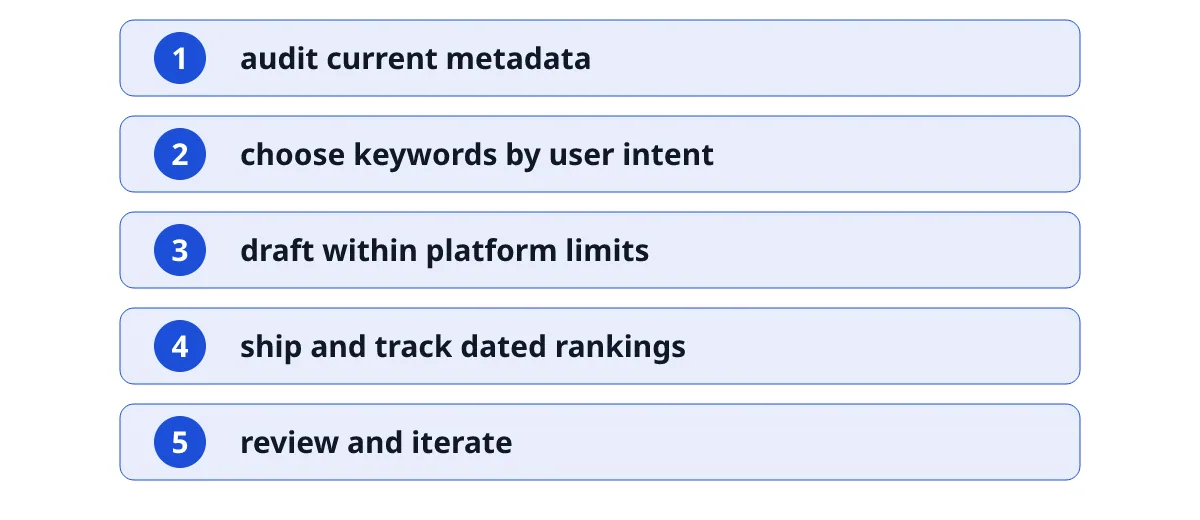
You improve keyword rankings by changing the text fields the store indexes, shipping the change, and checking dated rankings afterward, one change at a time. The steps below follow that order.
- Audit current metadata. List what sits in each indexed field. On iOS that means title, subtitle and the keywords field, and on Google Play the title, short description and full description.
- Choose keywords by user intent. Apple advises you to choose keywords based on words you think people may use to find an app like yours. Amazon's guide, written about its own store, gives a simple case: if your planner app is called To Do List, make sure you put "planner" in the keywords, so it will be indexed for that search term as well.
- Draft within platform limits. LiteASO's public feature page describes a workspace to create, edit, preview, and diagnose drafts against published platform limits. That is an attributed public description, not verified product behavior. Keep promotional text free of keywords, because promotional text doesn't affect your app's search ranking.
- Ship and track dated rankings. Whatever tool you use, record the term, date, storefront and observed position of every reading.
- Review and iterate. Apple recommends you review your search performance on an ongoing basis to understand the impact of your metadata, using impressions, conversion rate, downloads, and more in App Analytics. Amazon's guide warns: don't assume your app will maintain its ranking, because algorithms change and customers' tastes change.
One caution: a ranking is a result, and many things can move it. A keyword change followed by a rank rise is consistent with the change working, but it does not prove it.
Which claims about ranking factors should you treat with caution?
Treat any claim that gives an exact number, a named algorithm update or a guaranteed boost without naming a testable source. Apple and Google do not publish weightings, so precise figures from third parties are inferences at best.
An AppDNA guide offers examples of the kind to check. It says that Google and Apple scan review text for functional keywords, and that if 50+ reviews mention "easy checkout" or "fast shipping," your app gets a ranking boost for those phrases. The guide gives no source for the threshold in the text provided, and neither Apple's pages nor Google material in the documents mention it. It also states that 70% of App Store visitors use search to find new apps without showing where the figure comes from. Apple's own description of app tags is narrower: they are generated using large language models (LLMs) based on the metadata you've provided in App Store Connect, which is not the same as ranking on review text.
Patent-based lists need care too. A site that reads Apple's patents says every ASO ranking factor list in circulation is written from practitioner experience, which is legitimate, and not evidence, yet also warns that several of these documents have lapsed or expired, and two describe surfaces other than App Store search.
Even the research is narrow. The academic study in the Journal of Business Research used a sample of 500 of Apple's top grossing apps to analyze the top 50 and bottom 50 apps, and the Revenue Hacker analysis looked at a cross-section of the top 500 iOS (U.S. Apple App Store) and the top 500 Android (U.S. Google Play) apps. Neither is a keyword-search experiment.
What can you measure and change?
You can change your metadata and your app experience, and you can measure impressions, conversion rate, downloads and dated rankings, but not the store's weighting. Apple points to App Analytics in App Store Connect to monitor key metrics such as impressions, conversion rate, downloads, and more.
For competitor context, LiteASO's public feature page describes how to compare observed competitor results with your tracked terms in the same storefront scope, and mentions versioned estimates with confidence, coverage, country and observation context. It also describes how to turn observations into hypotheses to verify with supported store experiments. These are attributed public descriptions, not verified product behavior or performance results.
FAQ
Does promotional text help App Store rankings?
No. Apple says promotional text doesn't affect your app's search ranking so it should not be used to display keywords.
Does Google Play have a keyword field?
No. According to AsoBeast's audit documentation, Google Play has no subtitle or keyword field, and the short description takes their place.
Where do I check search performance?
Use App Analytics, where you can filter by source type, for example filtering conversion rate to understand how many people downloaded your app from App Store search.
Is keyword stuffing safe on Google Play?
No. Google Play's Metadata policy prohibits repetitive or excessive keyword usage in store listings.
Sources
- Discovery on the App Store and Mac App Store - App Store - Apple Developer
- How the App Store Ranking Algorithm Actually Works | MWM Guides
- App Store search - App Store - Apple Developer
- App Store Ranking Factors: What Apple’s Patents Actually Say – ASO Patents
- Reverse Engineering the App Store Ranking Algorithm - Revenue Hacker
- Learn more about search results and ranking - App Store
- Run an ASO audit - AsoBeast
- Google Play Ranking Factors 2026: ASO Strategy Guide
- Uncovering top-ranking factors for mobile apps through a multimethod approach - University of Lisbon
- ASO Guide 2025: Hack the Algorithm With the Best ASO Strategies - Blog - ASOeShop
- ASO 101: App store optimization for Amazon Developers
- liteaso.com
- App Store Optimization (ASO) Guide 2026: How to Rank Higher & Get More Downloads - AppDNA AI